
Document data — from your phone to your system
A8 QR Scan reads identity details and sends them to your connected system. No dedicated scanner or phone app required.
Have a computer and smartphone ready. Demo attempts are limited.
From a document photo to populated fields
The operator opens a session, photographs the document with a smartphone and receives the extracted fields in the connected application. Review and correct the data before saving.
Allows reading passports of the Republic of Kazakhstan citizens, foreign passports, identity cards, residence permits, as well as digital documents from a smartphone screen (public services on Kaspi, Halyk, ForteBank, etc.).
Benefits of QR Scan
No hardware needed
Forget buying expensive hardware scanners. A smartphone is all you need.
Data in your system
After recognition, identity details are available to the connected application.
Review before saving
Check extracted fields against the document. Results depend on image quality and document type.
The workflow in
three steps
We have simplified the document transfer process to the maximum, so you save the time of your clients and employees.
-
1
Scan QR The operator opens the program, scans the QR code that appears with a smartphone camera.
-
2
Document photo Takes a photo of the ID card. The system uses powerful AI to read the text.
-
3
Review the result Receive the extracted fields, check them against the document and save.
Suitable for your business:
API integration with 1C, CRM and industry software is scoped for your specific configuration.
What integration provides
Faster operations
Less manual typing
Assisted data entry
Review extracted fields
Error reduction
Review extracted fields
Customer convenience
Data in your workflow
Security
Data protection
Integration with your system
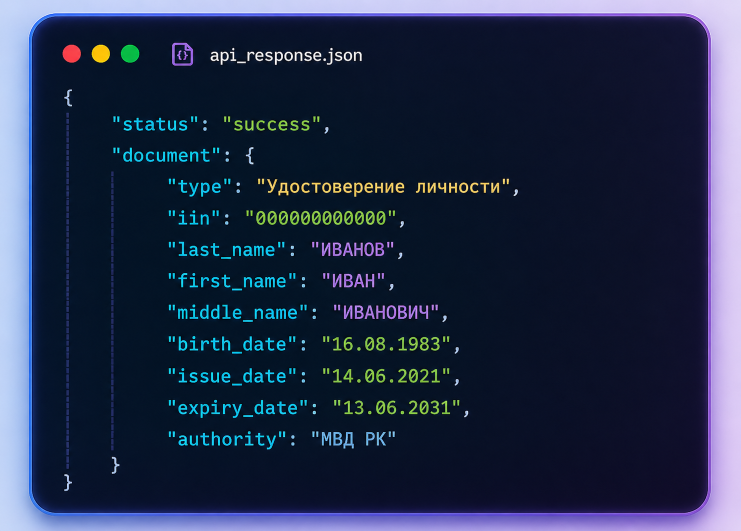
Structured document fields in JSON format.
Why choose us
No app required
Works directly in the browser
Cross-platform
iOS / Android
Minimum actions
No learning required
Fast implementation
Compatibility checked before integration
Support
Customization for business
Already used by exchange offices and financial services
The solution has been successfully implemented in A8PRO EXCHANGE automation systems
For 1C, CRM and industry software integrators
Bring document capture into your existing interface. The API returns structured fields; record creation, validation and storage remain in your system.
Tell us your system name and version, workflow and approximate document volume. Access keys are issued separately.
Integration questions
Do I need a phone app?
Scanning opens in the smartphone browser. For the demo, have a computer and an internet-connected camera phone ready.
Will it work with my 1C or CRM system?
Integration depends on the configuration and available interfaces. Share the application name and version so we can confirm compatibility and scope.
Does this retrieve data directly from eGov?
This page describes recognition of document photographs, including photos of a phone screen. Recognition alone does not authenticate a document or query eGov directly.
How do I get started?
Send your application name and workflow. We will discuss integration, data processing and result verification before use.
Connect QR Scan to your workflow
Tell us which application you use and which documents you need to read. We will help scope the integration.